External BI tools are available only on the enterprise plan.
In addition to fully customisable built-in reports, you can use pre-aggregated data stored in your Google BigQuery to build custom reports using third-party BI tools like Looker Studio.

Looker Studio integration guide

1

Clone the template

Copy the report from the Looker Studio template.
2

Access data sources

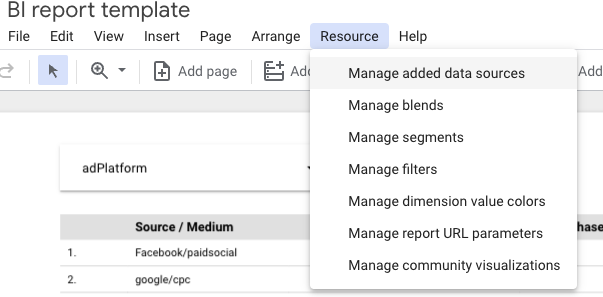
Navigate to the data sources section: Resource > Manage added data sources.Data sources section
3

Edit data source

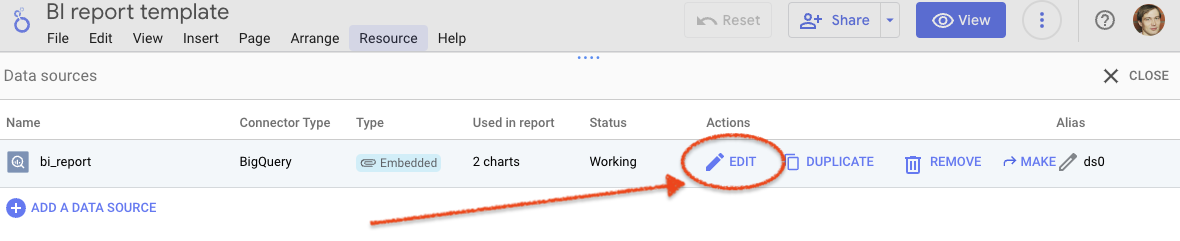
Click the Edit button.Edit data source
4

Modify connection

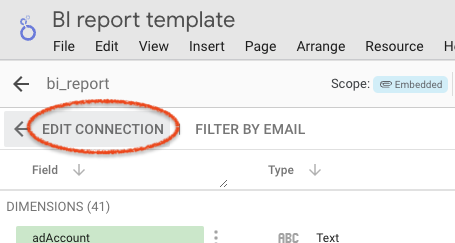
Select Edit Connection at the top left corner.Edit connection
5

Update project and dataset

Replace the existing project and dataset with the appropriate dataset from your project settings.Project and dataset configuration

SELECT *
FROM `YOUR_PROJECT.YOUR_DATASET.bi_report_v4`(
  PARSE_DATE('%Y%m%d', @DS_START_DATE),
  PARSE_DATE('%Y%m%d', @DS_END_DATE),
  30
);
6

Reconnect

Click the Reconnect button to apply the changes.
After following these steps, you will have Looker Studio connected to your SegmentStream data. This integration lets you visualise and analyse data in more versatile ways using all the features Looker Studio offers.