> ## Documentation Index
> Fetch the complete documentation index at: https://docs.segmentstream.com/llms.txt
> Use this file to discover all available pages before exploring further.
# Self-reported attribution
> Recover lost conversions from Direct, Brand, or Organic channels by asking users how they heard about you and mapping responses to paid or owned channels.
Self-reported attribution helps recover lost conversions from "Direct," "Brand," or "Organic" channels by asking users directly how they heard about your brand and then mapping these responses to the appropriate paid or owned channels.
## Add the "How did you hear about us?" field
Add an optional "How did you hear about us?" field to your registration, checkout, or lead form. Free-text is preferred, but you can also provide a list of answers to select from.
## Store responses in GA4 or CRM
You can store the user's answer as an event parameter in GA4 (for example, `self_reported_source`) or in your CRM. Both the **Client ID** and the **response** must be available in the source where this data is stored.
When the form is submitted, pass the user's answer to a custom event parameter, for example `self_reported_source`.
In Google Tag Manager, configure this in your GA4 event tag by adding a new **Event Parameter** and setting its value to the variable that contains the user's answer.
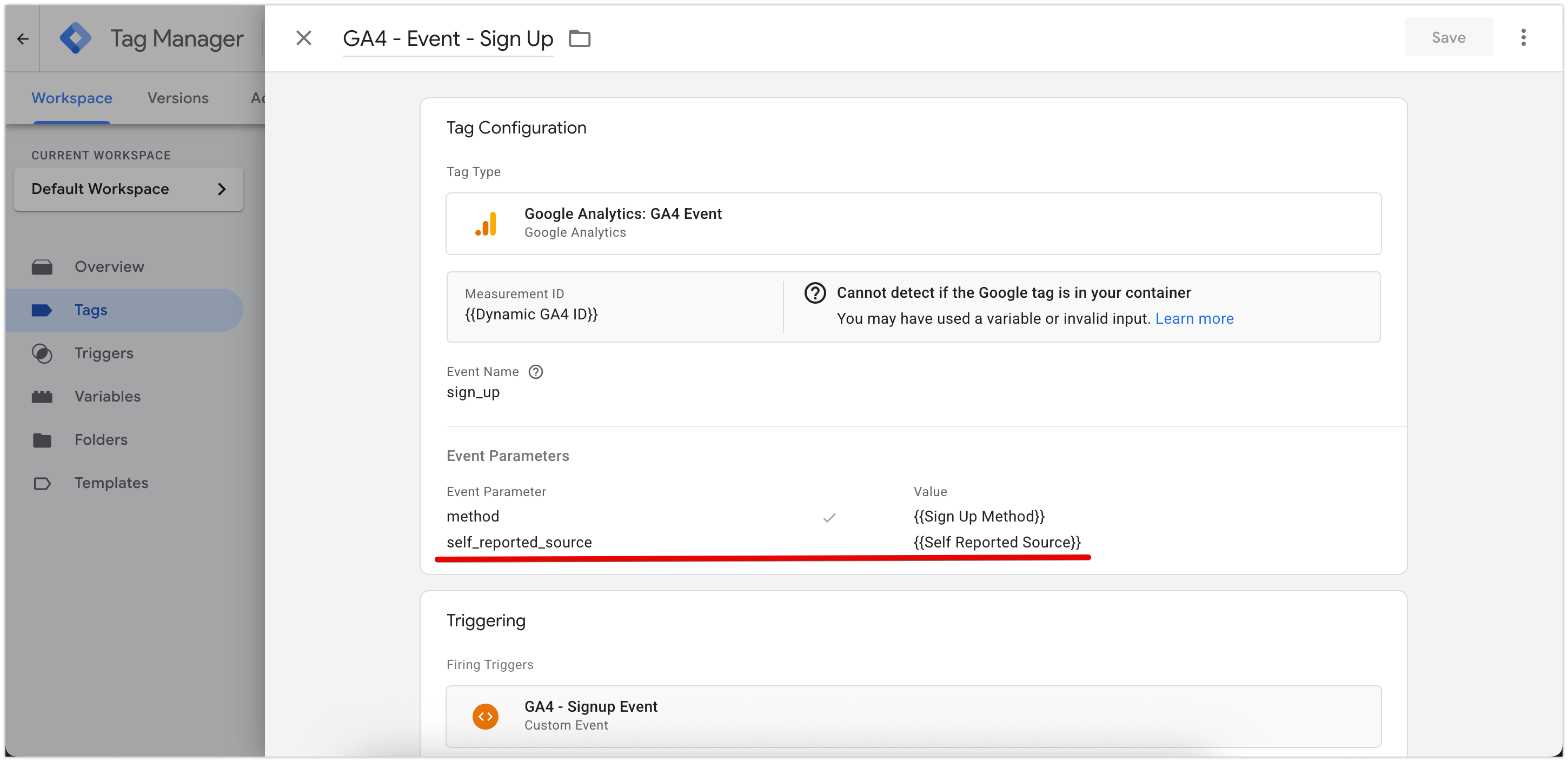 For CRM systems, pass the same value into one of the lead parameters, also named `self_reported_source` for example. The **Client ID** must be stored in the CRM together with this value to allow correct attribution stitching.
### Testing the implementation
Open your website in a test environment and complete the form using different responses.
In **GA4 DebugView**, confirm that the event is being sent correctly and that `self_reported_source` appears as a parameter.
If using a CRM, verify that the same field is populated correctly in the lead or transaction records.
Ensure that the **Client ID** is recorded together with the self-reported value.
Validate that the event fires once per submission and that the data appears within a few minutes in GA4 Realtime or CRM logs.
After successful testing, move the setup to production.
## Define business logic
After collecting sufficient responses, define which responses and how you would like to map them to your business channels. For example:
| User response | Mapped channel |
| -------------------------------- | -------------- |
| "Friend," "Local," or "Shop" | Referral |
| "YouTube" | Influencer |
| "Instagram" | Meta |
| "Newsletter," "Email from brand" | Email |
Keep a lookup table for consistent classification and to handle new response types as they appear. Even before re-attribution, the responses themselves provide insights into how customers perceive and discover your brand, helping identify which channels or touchpoints drive the strongest brand awareness and engagement.
## Re-attribute conversions
SegmentStream automatically classifies free-text responses using AI based on the business logic you define. It then uses classified data to re-attribute conversions that were originally labeled as Direct, Brand, Organic, etc. to their true paid or owned sources. The corrected attribution is then reflected in reports, improving visibility into real channel effectiveness.
For CRM systems, pass the same value into one of the lead parameters, also named `self_reported_source` for example. The **Client ID** must be stored in the CRM together with this value to allow correct attribution stitching.
### Testing the implementation
Open your website in a test environment and complete the form using different responses.
In **GA4 DebugView**, confirm that the event is being sent correctly and that `self_reported_source` appears as a parameter.
If using a CRM, verify that the same field is populated correctly in the lead or transaction records.
Ensure that the **Client ID** is recorded together with the self-reported value.
Validate that the event fires once per submission and that the data appears within a few minutes in GA4 Realtime or CRM logs.
After successful testing, move the setup to production.
## Define business logic
After collecting sufficient responses, define which responses and how you would like to map them to your business channels. For example:
| User response | Mapped channel |
| -------------------------------- | -------------- |
| "Friend," "Local," or "Shop" | Referral |
| "YouTube" | Influencer |
| "Instagram" | Meta |
| "Newsletter," "Email from brand" | Email |
Keep a lookup table for consistent classification and to handle new response types as they appear. Even before re-attribution, the responses themselves provide insights into how customers perceive and discover your brand, helping identify which channels or touchpoints drive the strongest brand awareness and engagement.
## Re-attribute conversions
SegmentStream automatically classifies free-text responses using AI based on the business logic you define. It then uses classified data to re-attribute conversions that were originally labeled as Direct, Brand, Organic, etc. to their true paid or owned sources. The corrected attribution is then reflected in reports, improving visibility into real channel effectiveness.