> ## Documentation Index
> Fetch the complete documentation index at: https://docs.segmentstream.com/llms.txt
> Use this file to discover all available pages before exploring further.
# Custom conversions
> Create conversions using SQL queries against raw BigQuery data for offline or CRM-based conversion tracking.
Custom conversions are available only on the [enterprise plan](https://segmentstream.com/pricing).
Custom conversions enable you to create conversions by writing an SQL query that uses any raw data present in your Google BigQuery. A common use case is tracking offline conversions through CRM systems.
Benefits of using custom conversions:
1. They are created and maintained by the SegmentStream technical team.
2. Any data in your BigQuery can be used to calculate conversions.
## Using CRM data
SegmentStream supports data sources for the following CRM tools, allowing you to load data directly into the connected Google BigQuery dataset:
* HubSpot
* Salesforce
* Microsoft Dynamics
* Pipedrive
If you use a different CRM tool, you will need to manually export the CRM data to BigQuery. Alternatively, reach out to your SegmentStream manager for assistance.
## Creating a custom conversion
Each row must include `id` and `created`, plus either a `client_id` (to attribute the conversion to a session directly) or a `lead_id` (to inherit attribution from a parent conversion). `client_id` is required unless the query returns a `lead_id`. Additional columns are optional based on available data.
* The `created` column must always contain a valid timestamp.
* For optional columns, assign `NULL` only if data is occasionally unavailable. If all values for a column are unknown, omit that column from the query.
* If your query involves a partitioned table (for example, partitioned by `date`), include a filter on the partition column in the `WHERE` clause:
```sql theme={null}
WHERE date BETWEEN @start_date AND @end_date
```
| SQL field name | Type | Description | Required |
| -------------- | ----------------------------------------- | ---------------------------------------------------------------------------------------------------------------------------------------------------------------------------------------------------------------------------------------------------------------------------------------------------------------------------------------------------------------- | ----------- |
| `id` | STRING | ID of conversion/order used for deduplication | Yes |
| `client_id` | STRING | Client ID from your analytics tracker (for example, the Google Analytics client ID) used to stitch the conversion to the user's session. Required unless the query returns a `lead_id` (see [Inherit attribution from](#inherit-attribution-from)). If neither resolves, the conversion is marked as (not attributed) in reports. | Conditional |
| `created` | TIMESTAMP | Date and time of the conversion | Yes |
| `value` | FLOAT64 | The monetary value of the conversion | No |
| `currency` | STRING | 3-letter [ISO 4217](https://www.iso.org/iso-4217-currency-codes.html) currency code (USD, EUR, GBP). If NULL, project currency is used. | No |
| `is_qualified` | BOOLEAN | True if conversion reached target status | No |
| `params` | ARRAY\> | Array of custom parameters passed with each conversion | No |
| `user_id` | STRING | User's ID from the CRM | No |
| `lead_id` | STRING | Matches a record in the parent conversion selected under [Inherit attribution from](#inherit-attribution-from) (by the parent's `id`), so this row inherits the parent's attribution. Use instead of `client_id` when a conversion has no session of its own -- for example a CRM deal that descends from an earlier lead. Required when that option is enabled. | Conditional |
For lead generation businesses, collecting the conversion value is recommended as it allows SegmentStream to enhance its ML model.
### Collecting geo data from CRM
To improve your market selection options for launching geo tests, consider collecting geo location data in your CRM.
When adding geo data from your CRM, include it in the `params` column as key-value pairs. The `key` should indicate the geographical scope (city, country, or region), while the `value` should specify the name of the geo location.
### Example
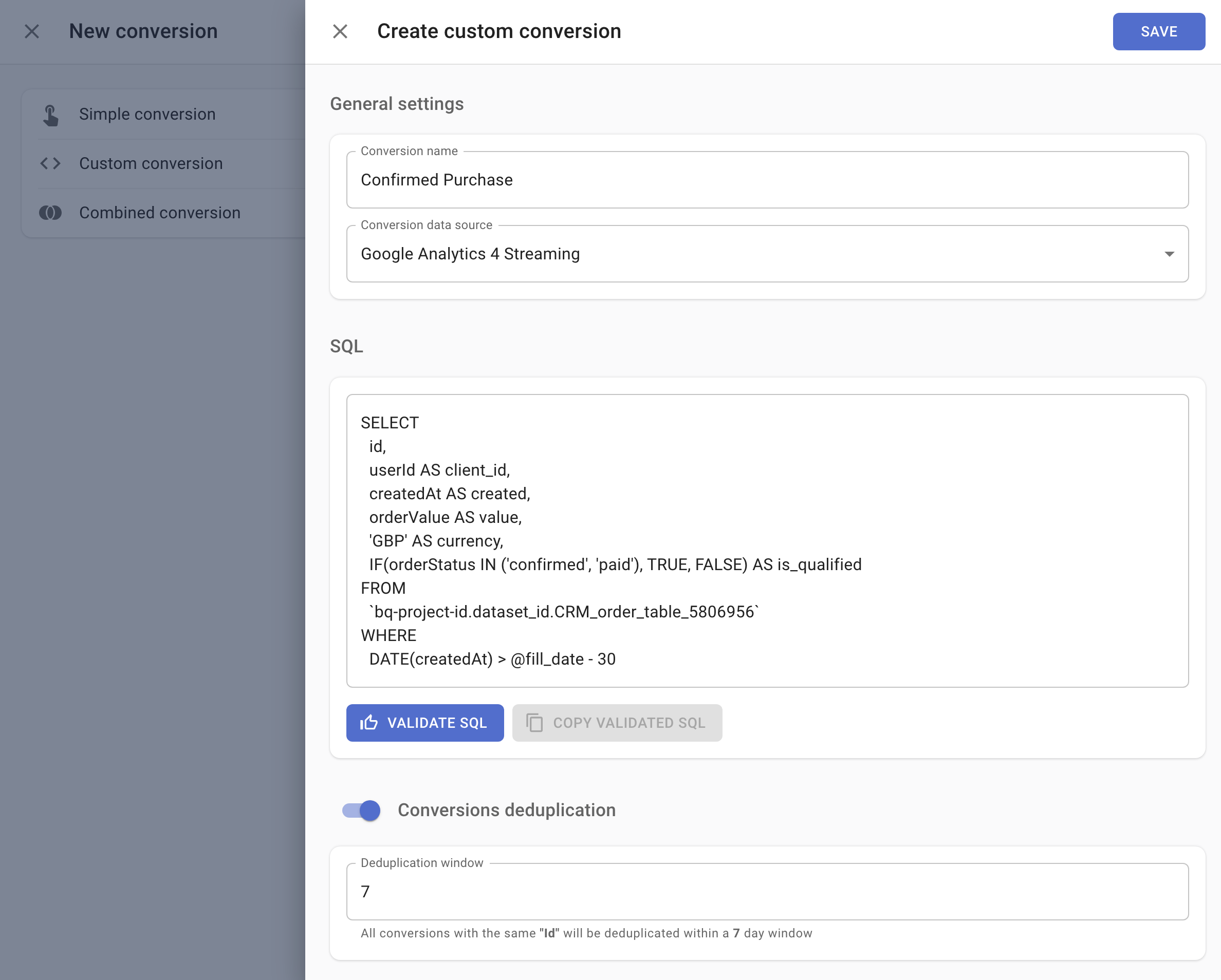
After a user purchases a service on your website, they need to confirm their order when contacted by your call centre staff. Once a call centre operator receives confirmation, they update the status in the CRM system.
To view users who have confirmed their purchase in SegmentStream reports, load the data from the CRM system into BigQuery. Then create a custom conversion with SQL that extracts conversions from the CRM data, along with a client identifier used to stitch the conversion to the user's website session.
The following code runs a daily check on website orders created within the last 30 days. It marks them as conversions if their CRM statuses are "confirmed" or "paid", and collects the country, region, and city information.
```sql theme={null}
SELECT
id,
userId AS client_id,
createdAt AS created,
orderValue AS value,
'GBP' AS currency,
IF(orderStatus IN ('confirmed', 'paid'), TRUE, FALSE) AS is_qualified,
ARRAY(SELECT AS STRUCT * FROM UNNEST(properties) WHERE key IN ('country', 'region', 'city')) AS params
FROM
`bq-project-id.dataset_id.CRM_order_table_5806956`
WHERE
date BETWEEN DATE_SUB(@start_date, INTERVAL 30 DAY) AND @end_date
```
 ## Predicted value
You can use a predicted value for your custom conversions. This value is calculated by linking a target conversion's value to the probability of that conversion occurring.
To activate this feature, the `user_id` fields in both the target custom conversion and in any custom conversion for which you want a predicted value should be based on the same identifier. Also, the CRM data that the custom conversion is built on should contain user-related data -- such as geolocation, activities, and any other information particular to that user. This data serves as features for the machine learning model that predicts the value.
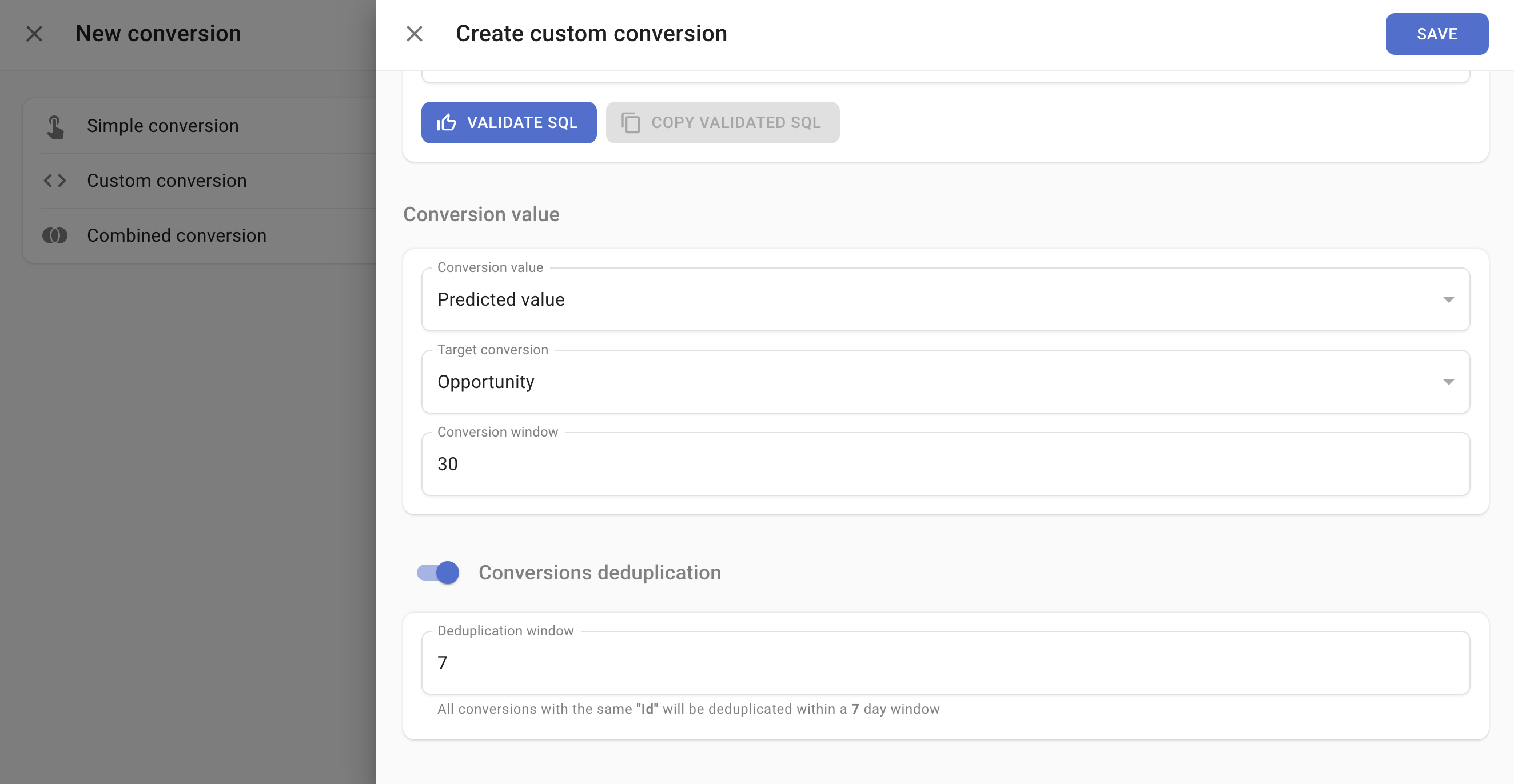
When you validate the SQL for your custom conversion, you will find an option called "Predicted value." Choosing this reveals two more fields:
* **Target conversion** -- shows all eligible conversions for value prediction. To qualify, a custom conversion needs the `user_id` field and at least one conversion in the past 60 days.
* **Conversion window** -- sets the maximum timeframe for linking conversions.
Once you save your settings, the ML model calculates the predicted value for each conversion within about 15 minutes.
### Use case
Consider this scenario: you track two types of conversions. The first is called "Lead," which occurs when someone submits a form. The second, "Deal Closed," happens when a lead converts into a deal. Each deal has a unique value.
To estimate the value of each lead, create a modified "Lead" conversion. Enhance the SQL by incorporating CRM data features such as the number of times the user has contacted sales, their business country, and their job title. Set the conversion value to "Predicted value," choose "Deal Closed" as the target conversion, and set the conversion window to 40 days to accommodate the typical duration within which most leads convert into deals.
After SegmentStream completes its calculations, you can view the predicted value of each lead based on the value of the deals that have closed.
## Predicted value
You can use a predicted value for your custom conversions. This value is calculated by linking a target conversion's value to the probability of that conversion occurring.
To activate this feature, the `user_id` fields in both the target custom conversion and in any custom conversion for which you want a predicted value should be based on the same identifier. Also, the CRM data that the custom conversion is built on should contain user-related data -- such as geolocation, activities, and any other information particular to that user. This data serves as features for the machine learning model that predicts the value.
When you validate the SQL for your custom conversion, you will find an option called "Predicted value." Choosing this reveals two more fields:
* **Target conversion** -- shows all eligible conversions for value prediction. To qualify, a custom conversion needs the `user_id` field and at least one conversion in the past 60 days.
* **Conversion window** -- sets the maximum timeframe for linking conversions.
Once you save your settings, the ML model calculates the predicted value for each conversion within about 15 minutes.
### Use case
Consider this scenario: you track two types of conversions. The first is called "Lead," which occurs when someone submits a form. The second, "Deal Closed," happens when a lead converts into a deal. Each deal has a unique value.
To estimate the value of each lead, create a modified "Lead" conversion. Enhance the SQL by incorporating CRM data features such as the number of times the user has contacted sales, their business country, and their job title. Set the conversion value to "Predicted value," choose "Deal Closed" as the target conversion, and set the conversion window to 40 days to accommodate the typical duration within which most leads convert into deals.
After SegmentStream completes its calculations, you can view the predicted value of each lead based on the value of the deals that have closed.
 ## Inherit attribution from
**Inherit attribution from** lets a conversion borrow its attribution from a parent conversion that already carries the user's journey, instead of attributing itself. This helps in two situations:
* **The conversion has no identifier of its own.** A conversion recorded in a CRM after the on-site session has ended often has no `client_id` to attribute -- but the lead or checkout it descends from does.
* **Long sales cycles.** In a lead -> opportunity -> deal funnel, the click-to-lead gap is short, but the lead-to-deal gap can be 6--12 months. Instead of keeping a 12-month attribution window so each deal can rediscover the original click, attribute the *lead* within a short window and let the deal reuse the lead's attribution.
Each row of the child conversion's SQL returns a `lead_id`; SegmentStream matches it to a record in the parent conversion (by the parent record's `id`), and the child inherits that record's attribution.
### How to enable
1. Add a `lead_id STRING` column to your SQL and re-validate the query. Each value must match the `id` of a record in the parent conversion.
2. Turn on **Inherit attribution from** and select the parent conversion.
The parent must be a Simple, Custom, or Combined conversion in the same project. A conversion cannot inherit from itself, and inheritance chains cannot form a cycle.
### How rows are attributed
A row can return both a `client_id` and a `lead_id`. SegmentStream gives each row the best attribution available:
1. **`lead_id` matches a parent record** -- the row inherits the parent's attribution. (If the matched parent is itself unattributed but the row has its own `client_id`, the row keeps its own attribution rather than inheriting "(not attributed)".)
2. **`lead_id` matches no parent** -- the row keeps whatever it resolved on its own: a `client_id` gives it session-based attribution; with no `client_id` it is **(not attributed)**.
Enable **Only track linked conversions** to keep a conversion *only* when its `lead_id` matches a parent record -- unmatched rows are dropped entirely, even if they carry a `client_id`.
### Use case
A B2B funnel runs lead -> opportunity -> deal, and deals can close 6--12 months after the first click. Create a **Lead** conversion (the parent), attributed normally from the on-site form submission. Then build a **Deal** conversion (the child) from your CRM's closed deals that returns `lead_id` = the originating lead's id. Each deal inherits its lead's attribution, so closed-won revenue is credited to the channel that generated the lead -- without keeping a year-long attribution window.
## Conversions adjustment
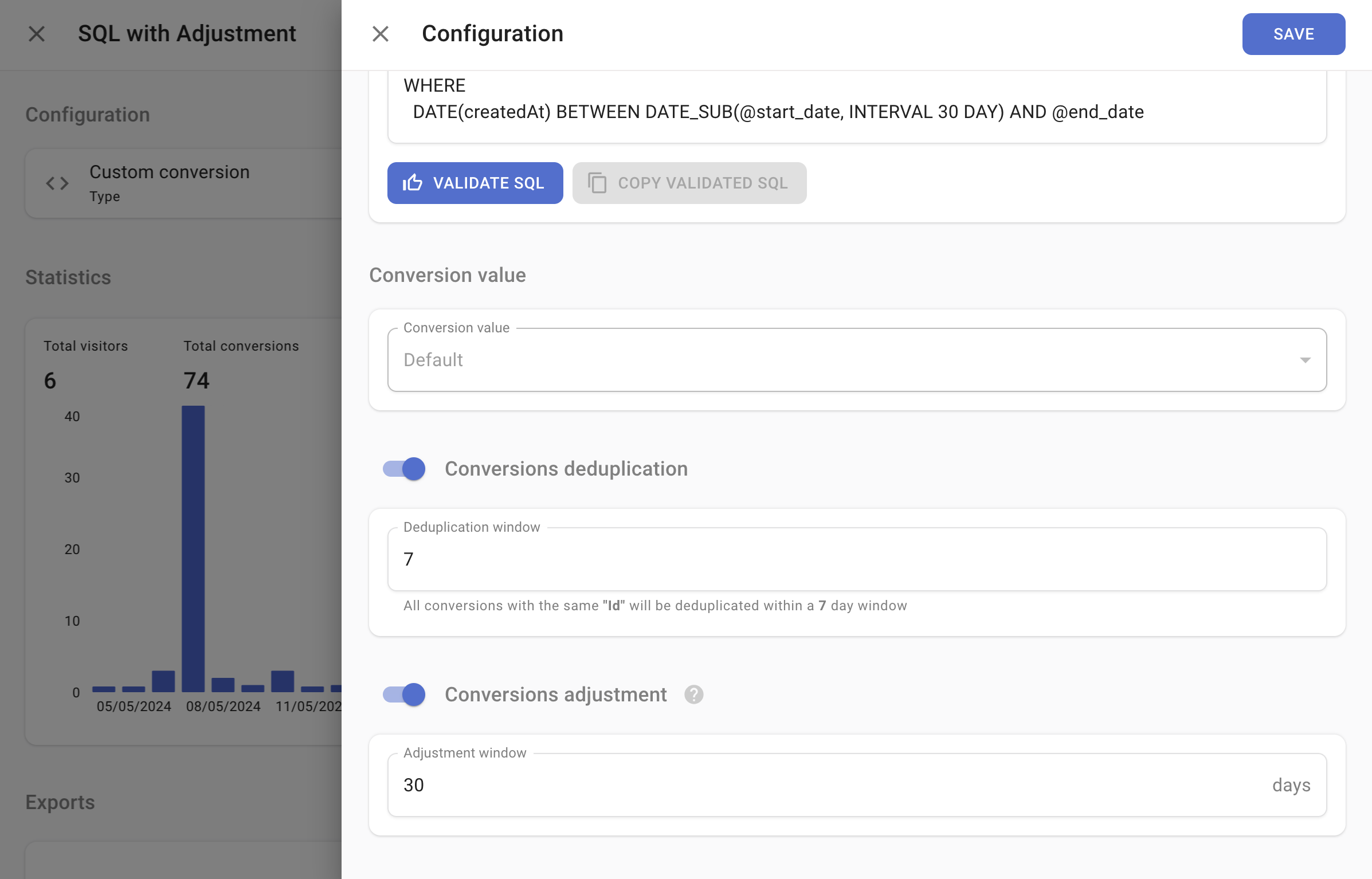
Enabling conversions adjustment allows you to specify a time window, in days, during which conversion data in SegmentStream can be updated based on changes detected in your CRM. This keeps SegmentStream data aligned with your CRM records.
## Inherit attribution from
**Inherit attribution from** lets a conversion borrow its attribution from a parent conversion that already carries the user's journey, instead of attributing itself. This helps in two situations:
* **The conversion has no identifier of its own.** A conversion recorded in a CRM after the on-site session has ended often has no `client_id` to attribute -- but the lead or checkout it descends from does.
* **Long sales cycles.** In a lead -> opportunity -> deal funnel, the click-to-lead gap is short, but the lead-to-deal gap can be 6--12 months. Instead of keeping a 12-month attribution window so each deal can rediscover the original click, attribute the *lead* within a short window and let the deal reuse the lead's attribution.
Each row of the child conversion's SQL returns a `lead_id`; SegmentStream matches it to a record in the parent conversion (by the parent record's `id`), and the child inherits that record's attribution.
### How to enable
1. Add a `lead_id STRING` column to your SQL and re-validate the query. Each value must match the `id` of a record in the parent conversion.
2. Turn on **Inherit attribution from** and select the parent conversion.
The parent must be a Simple, Custom, or Combined conversion in the same project. A conversion cannot inherit from itself, and inheritance chains cannot form a cycle.
### How rows are attributed
A row can return both a `client_id` and a `lead_id`. SegmentStream gives each row the best attribution available:
1. **`lead_id` matches a parent record** -- the row inherits the parent's attribution. (If the matched parent is itself unattributed but the row has its own `client_id`, the row keeps its own attribution rather than inheriting "(not attributed)".)
2. **`lead_id` matches no parent** -- the row keeps whatever it resolved on its own: a `client_id` gives it session-based attribution; with no `client_id` it is **(not attributed)**.
Enable **Only track linked conversions** to keep a conversion *only* when its `lead_id` matches a parent record -- unmatched rows are dropped entirely, even if they carry a `client_id`.
### Use case
A B2B funnel runs lead -> opportunity -> deal, and deals can close 6--12 months after the first click. Create a **Lead** conversion (the parent), attributed normally from the on-site form submission. Then build a **Deal** conversion (the child) from your CRM's closed deals that returns `lead_id` = the originating lead's id. Each deal inherits its lead's attribution, so closed-won revenue is credited to the channel that generated the lead -- without keeping a year-long attribution window.
## Conversions adjustment
Enabling conversions adjustment allows you to specify a time window, in days, during which conversion data in SegmentStream can be updated based on changes detected in your CRM. This keeps SegmentStream data aligned with your CRM records.
 ## BigQuery access issues
If the data from your CRM is exported to a different project than the one specified in the SegmentStream BigQuery settings, provide the SegmentStream service account email with the **BigQuery Data Viewer** and **BigQuery User** roles for that project before setting up custom conversions.
## BigQuery access issues
If the data from your CRM is exported to a different project than the one specified in the SegmentStream BigQuery settings, provide the SegmentStream service account email with the **BigQuery Data Viewer** and **BigQuery User** roles for that project before setting up custom conversions.