> ## Documentation Index
> Fetch the complete documentation index at: https://docs.segmentstream.com/llms.txt
> Use this file to discover all available pages before exploring further.
# Attribution models
> Configure attribution models in SegmentStream to determine how marketing touchpoints receive credit for conversions.
Marketing attribution is the process of determining which marketing efforts contribute to conversions.
All attribution models in SegmentStream are non-direct. This means that if there was a direct visit to the website in a sequence of touchpoints, SegmentStream will not give any credit to this visit. The only way for conversion credit to be attributed to the direct channel is when there were one or more direct visits that ended up with a conversion.
For more information on how attribution models work, refer to the [SegmentStream basics](/segmentstream-basics) article.
## Managing attribution models
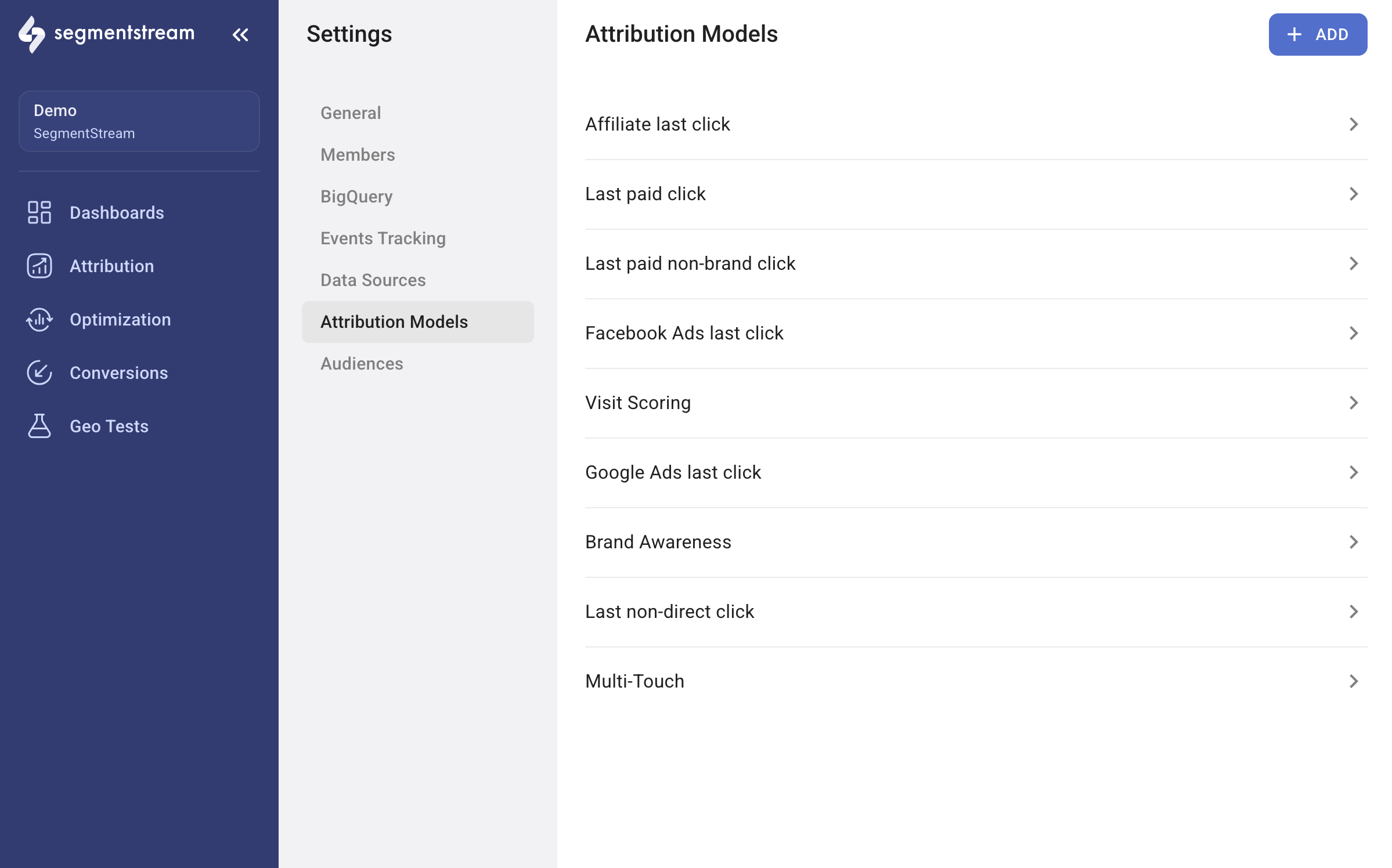
To manage your attribution models, navigate to **Settings** > **Attribution Models**.
* To create a new attribution model, click **+ ADD** in the top-right corner. This opens the configuration window.
* To edit an existing attribution model, click on its name in the list.
 ## Model types
SegmentStream provides four types of attribution models, each of which can be customized to meet your specific requirements.
Assigns all credit to the final marketing touchpoint before conversion.
Assigns all credit to the initial marketing touchpoint before conversion.
Evaluates each session for lift in purchase probability and assigns credit based on intent signals.
Assigns fractional conversion credit based on user behaviour after each click.
The last-click attribution model assigns all credit for a conversion to the final marketing touchpoint that a customer interacts with before converting.
### Configuration
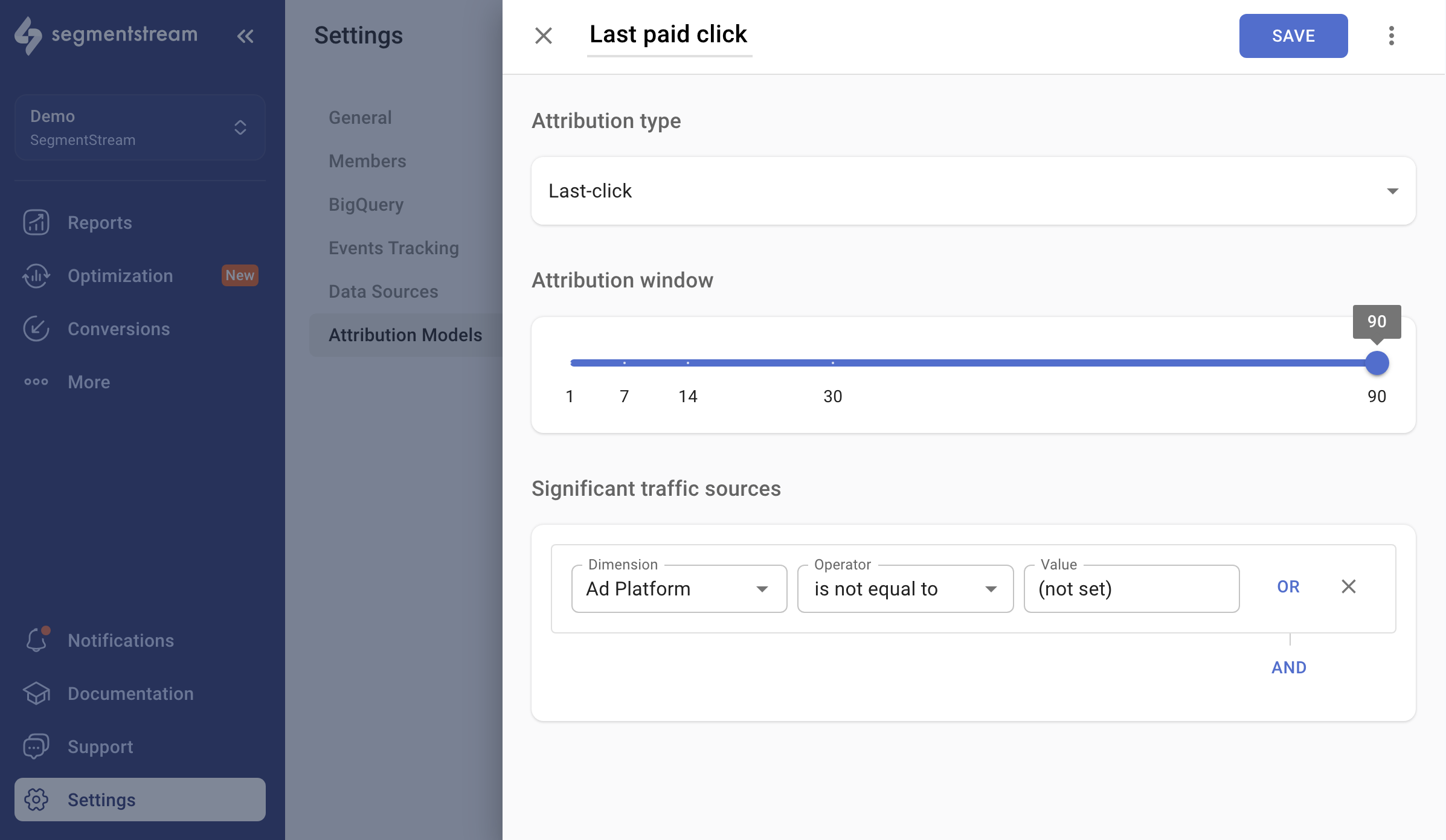
* **Name** -- enter the name as you want it to appear in the reports dashboard.
* **Attribution type** -- select `Last-click` from the selector.
* **Attribution window** -- determines the time window within which a conversion can be attributed to the last significant click. For example, if a user visits a website through Facebook Ads and, within 14 days, visits the website directly and makes a conversion, the attribution window affects which touchpoint gets credit in reports.
### Significant traffic sources
You can adjust your attribution model by excluding unwanted referrers. For instance, if you wish to provide credit only to paid channels like Facebook, set up the following filter:
* Dimension: `Ad Platform`
* Operator: `is not equal to`
* Value: `(not set)`
In this case, SegmentStream attributes all the value to the last paid click, ignoring not only direct visits but also organic, email, referral, and other channels.
## Model types
SegmentStream provides four types of attribution models, each of which can be customized to meet your specific requirements.
Assigns all credit to the final marketing touchpoint before conversion.
Assigns all credit to the initial marketing touchpoint before conversion.
Evaluates each session for lift in purchase probability and assigns credit based on intent signals.
Assigns fractional conversion credit based on user behaviour after each click.
The last-click attribution model assigns all credit for a conversion to the final marketing touchpoint that a customer interacts with before converting.
### Configuration
* **Name** -- enter the name as you want it to appear in the reports dashboard.
* **Attribution type** -- select `Last-click` from the selector.
* **Attribution window** -- determines the time window within which a conversion can be attributed to the last significant click. For example, if a user visits a website through Facebook Ads and, within 14 days, visits the website directly and makes a conversion, the attribution window affects which touchpoint gets credit in reports.
### Significant traffic sources
You can adjust your attribution model by excluding unwanted referrers. For instance, if you wish to provide credit only to paid channels like Facebook, set up the following filter:
* Dimension: `Ad Platform`
* Operator: `is not equal to`
* Value: `(not set)`
In this case, SegmentStream attributes all the value to the last paid click, ignoring not only direct visits but also organic, email, referral, and other channels.
 The first click attribution model assigns all credit for a conversion to the initial marketing touchpoint that a customer interacts with before converting.
### Configuration
* **Name** -- enter the name as you want it to appear in the reports dashboard.
* **Attribution type** -- select `First Click` from the selector.
The multi-touch attribution model evaluates each session for lift in purchase probability and assigns credit only if:
* The visit increased the likelihood of conversion.
* Behavioural signals (for example, product views, time on site, repeat visits) show meaningful intent.
### Configuration
* **Name** -- enter the name as you want it to appear in the reports dashboard.
* **Attribution type** -- select `Multi-Touch` from the selector.
### Significant traffic sources
You can adjust your attribution model by excluding unwanted referrers. For instance, if you wish to provide credit only to paid channels and to non-brand campaigns, set up the following filters:
* Dimension: `Ad Platform`, Operator: `is not empty`
* Dimension: `Campaign`, Operator: `does not contain`, Value: `brand`
In this case, SegmentStream attributes value to paid non-brand sessions, unless such sessions were not tracked.
The Visit Scoring attribution model is a multi-touch, cross-channel, cross-device attribution model that assigns fractional parts of conversion and conversion value based on user behaviour after each click.
For more information, read the [SegmentStream basics](/segmentstream-basics) article.
### Configuration
* **Name** -- enter the name as you want it to appear in the reports dashboard.
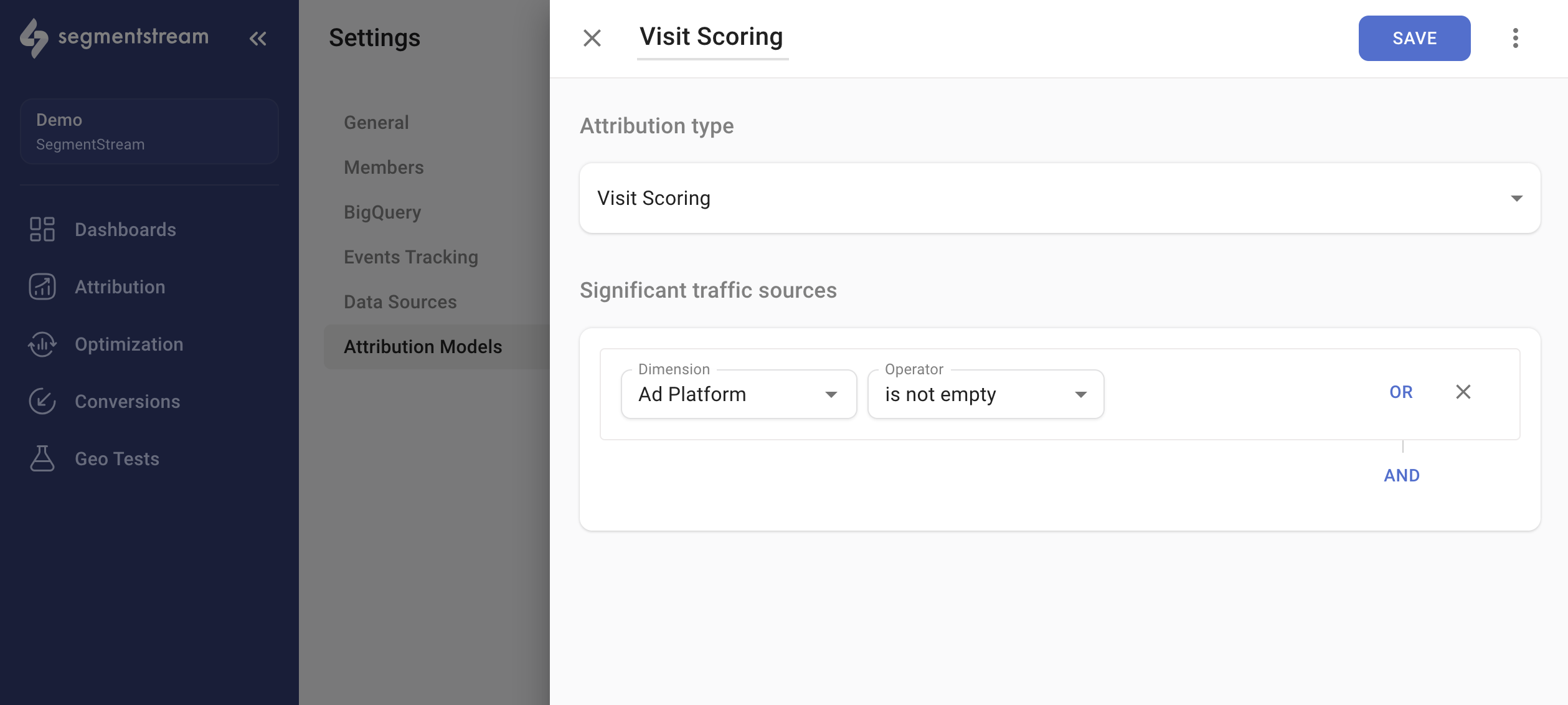
* **Attribution type** -- select `Visit Scoring` from the selector.
### Significant traffic sources
You can adjust your attribution model by excluding unwanted referrers. For instance, if you wish to provide credit only to paid channels, set up the following filter:
* Dimension: `Ad Platform`
* Operator: `is not empty`
In this case, SegmentStream attributes all the value to paid clicks, ignoring direct visits, organic, email, referral, and other channels.
The first click attribution model assigns all credit for a conversion to the initial marketing touchpoint that a customer interacts with before converting.
### Configuration
* **Name** -- enter the name as you want it to appear in the reports dashboard.
* **Attribution type** -- select `First Click` from the selector.
The multi-touch attribution model evaluates each session for lift in purchase probability and assigns credit only if:
* The visit increased the likelihood of conversion.
* Behavioural signals (for example, product views, time on site, repeat visits) show meaningful intent.
### Configuration
* **Name** -- enter the name as you want it to appear in the reports dashboard.
* **Attribution type** -- select `Multi-Touch` from the selector.
### Significant traffic sources
You can adjust your attribution model by excluding unwanted referrers. For instance, if you wish to provide credit only to paid channels and to non-brand campaigns, set up the following filters:
* Dimension: `Ad Platform`, Operator: `is not empty`
* Dimension: `Campaign`, Operator: `does not contain`, Value: `brand`
In this case, SegmentStream attributes value to paid non-brand sessions, unless such sessions were not tracked.
The Visit Scoring attribution model is a multi-touch, cross-channel, cross-device attribution model that assigns fractional parts of conversion and conversion value based on user behaviour after each click.
For more information, read the [SegmentStream basics](/segmentstream-basics) article.
### Configuration
* **Name** -- enter the name as you want it to appear in the reports dashboard.
* **Attribution type** -- select `Visit Scoring` from the selector.
### Significant traffic sources
You can adjust your attribution model by excluding unwanted referrers. For instance, if you wish to provide credit only to paid channels, set up the following filter:
* Dimension: `Ad Platform`
* Operator: `is not empty`
In this case, SegmentStream attributes all the value to paid clicks, ignoring direct visits, organic, email, referral, and other channels.