> ## Documentation Index
> Fetch the complete documentation index at: https://docs.segmentstream.com/llms.txt
> Use this file to discover all available pages before exploring further.
# Optimization overview
> Analyze your portfolio's performance over time with adoption rates, prediction accuracy, and gain metrics to make data-driven budget decisions.
The Optimization Overview page provides a view of your portfolio's performance over time. It helps you analyze the impact of your budget allocation decisions and make data-driven adjustments to maximize results in future periods.
## Key features
* Available immediately after portfolio creation.
* Serves as an audit tool to predict future outcomes.
* Allows you to decide whether to modify portfolio settings before starting optimization.
## Accessing the overview page
1. Navigate to the portfolio page.
2. Click the **Overview** button in the top right corner.
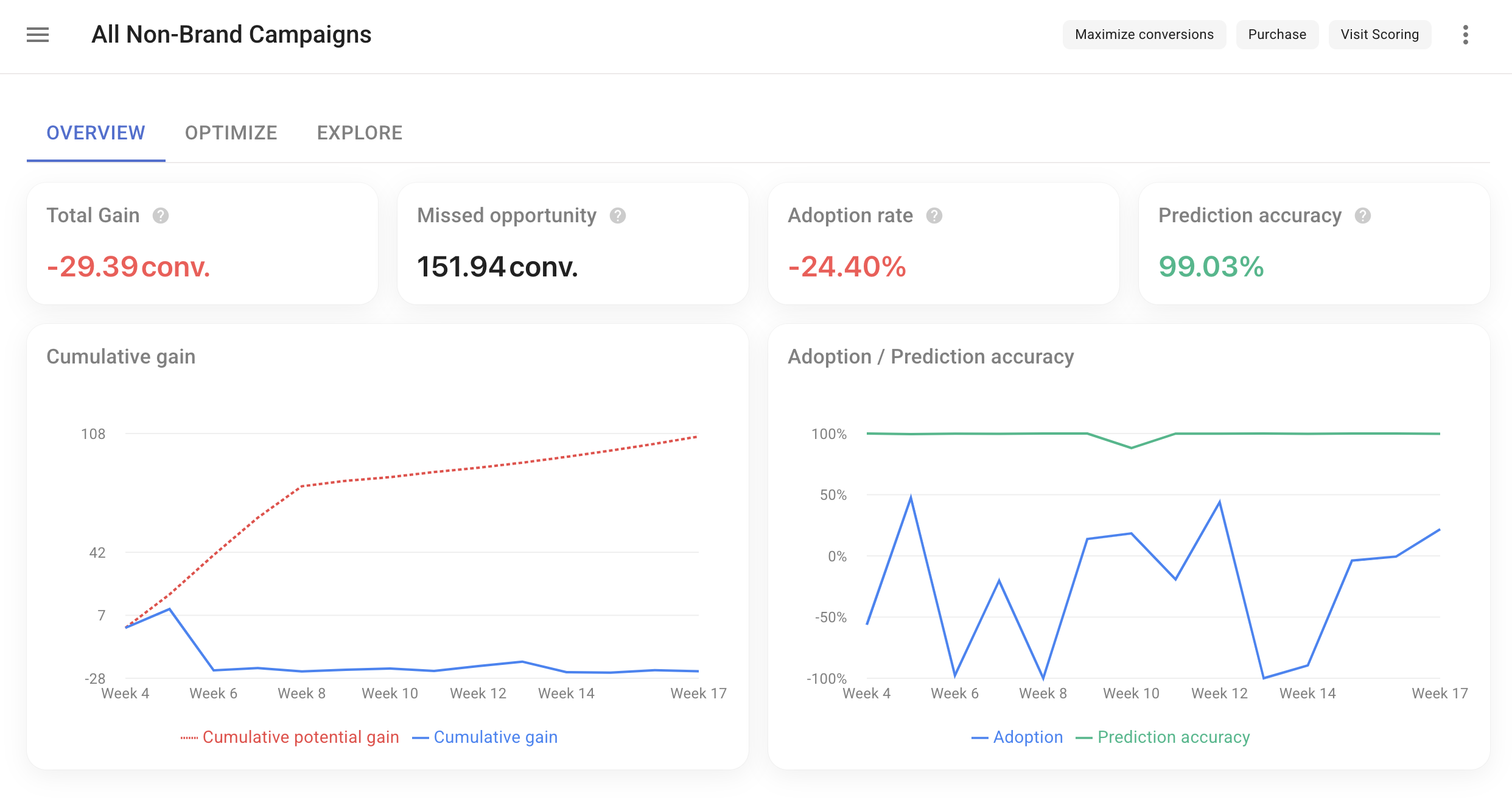
## Summary metrics
* **Total Gain** -- Net results achieved through budget allocation changes.
* **Missed Opportunity** -- Potential results lost due to not fully following recommendations.
* **Adoption Rate** -- Percentage indicating adherence to recommended budget distribution.
* **Prediction Accuracy** -- Accuracy of system recommendations based on previous data.
### Visual analysis
* **Cumulative Gain Chart** -- Displays cumulative gain and potential gain over the selected period.
* **Adoption Chart** -- Shows adoption rate and prediction accuracy over time.
 ### Detailed period analysis
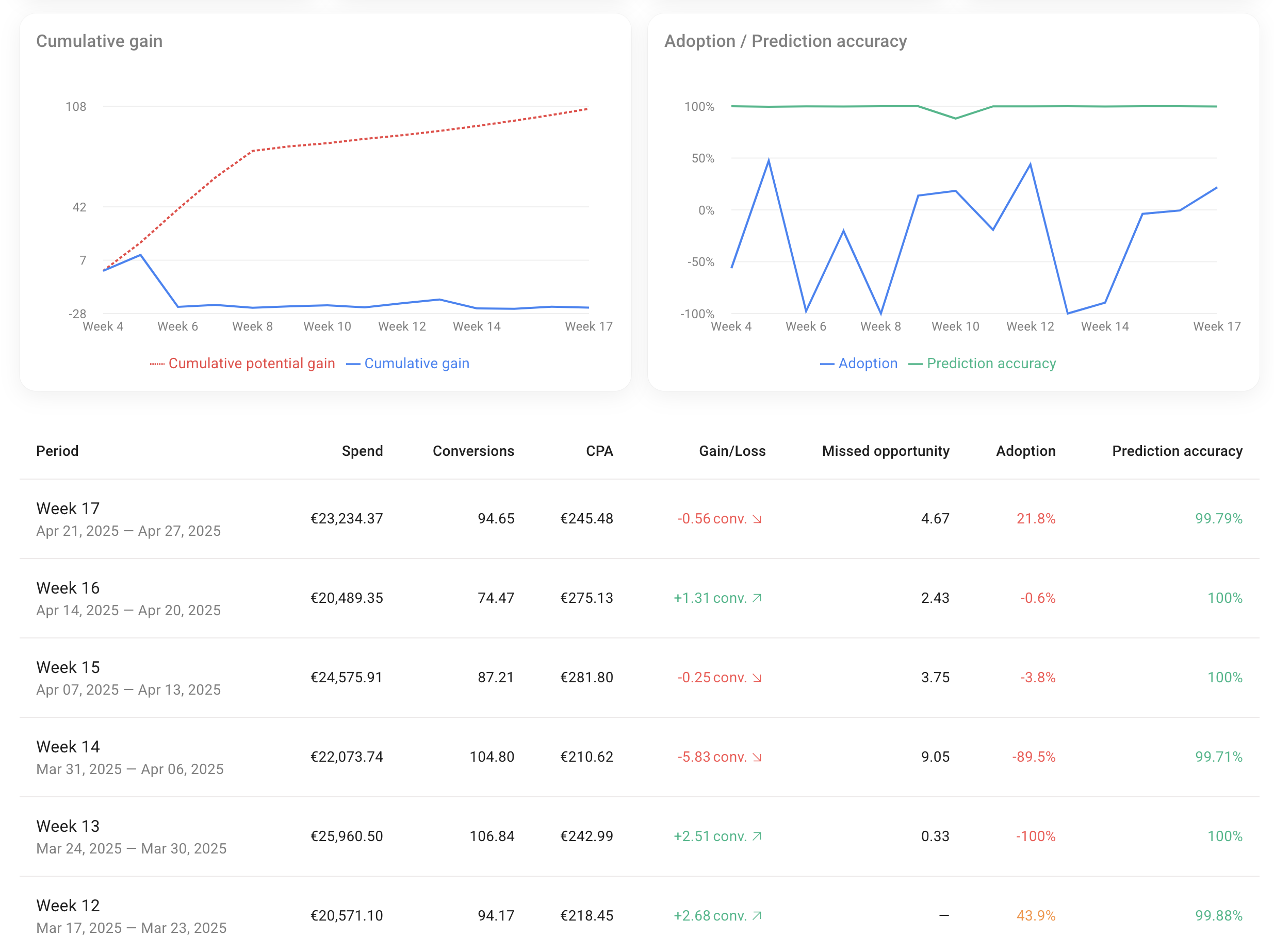
For each period, the following metrics are provided:
* Spend
* Revenue or Conversions
* ROAS or CPA
* Gain/Loss
* Missed Opportunity
* Adoption
* Prediction Accuracy
### Detailed period analysis
For each period, the following metrics are provided:
* Spend
* Revenue or Conversions
* ROAS or CPA
* Gain/Loss
* Missed Opportunity
* Adoption
* Prediction Accuracy
 ### Portfolio breakdown
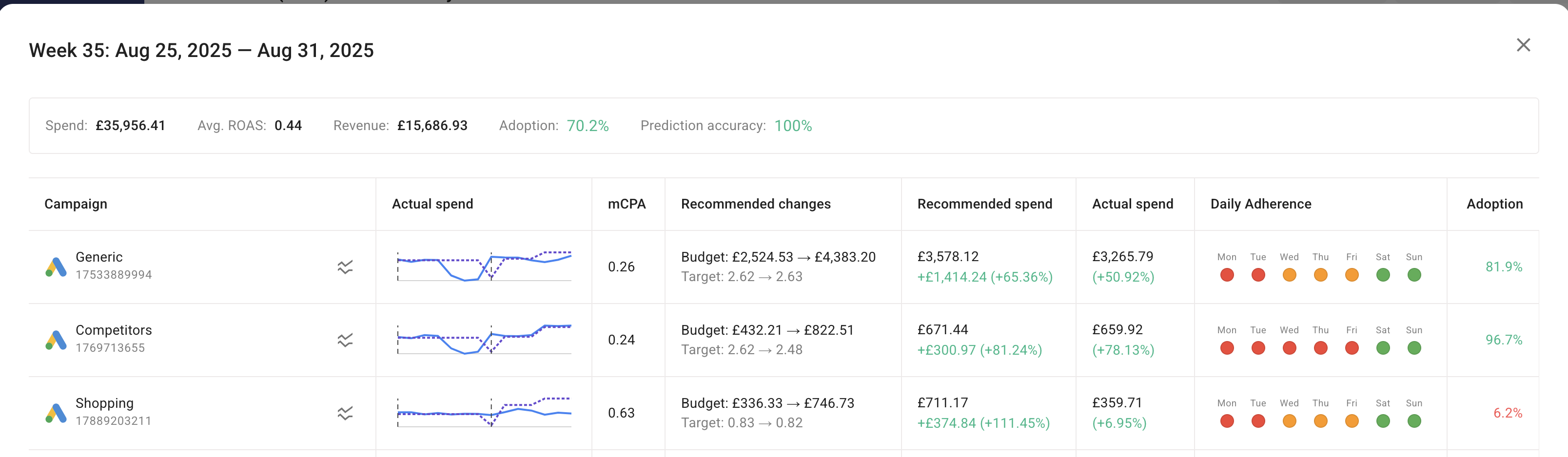
When you select a specific period, you see a detailed breakdown of each component:
* **Actual Spend** -- A chart showing two lines (recommended spend and actual spend). Hover over the chart to view daily values.
* **mROAS / mCPA** -- Marginal Return on Ad Spend or marginal Cost per Action, depending on the portfolio settings.
* **Recommended Changes** -- Suggested adjustments (budget and tROAS) to reach the recommended spend.
* **Recommended Spend** -- The suggested spend for the period, including the difference compared to the previous period.
* **Actual Spend** -- The actual spend for the period, including the difference compared to the previous period.
* **Daily Adherence** -- How closely the campaign settings in the ad platform align with the portfolio's recommended changes (currently only available for Google Ads).
* **Adoption** -- How closely the recommended budget spend allocations are being followed.
### Portfolio breakdown
When you select a specific period, you see a detailed breakdown of each component:
* **Actual Spend** -- A chart showing two lines (recommended spend and actual spend). Hover over the chart to view daily values.
* **mROAS / mCPA** -- Marginal Return on Ad Spend or marginal Cost per Action, depending on the portfolio settings.
* **Recommended Changes** -- Suggested adjustments (budget and tROAS) to reach the recommended spend.
* **Recommended Spend** -- The suggested spend for the period, including the difference compared to the previous period.
* **Actual Spend** -- The actual spend for the period, including the difference compared to the previous period.
* **Daily Adherence** -- How closely the campaign settings in the ad platform align with the portfolio's recommended changes (currently only available for Google Ads).
* **Adoption** -- How closely the recommended budget spend allocations are being followed.
 ## Understanding adoption
Adoption shows how closely your actual budget allocation follows the recommendations.
### The basics
Three budget distributions are compared:
1. **Previous** -- How you spent your budget in the last period.
2. **Recommended** -- How the system suggested you allocate your budget for this period.
3. **Actual** -- How you actually spent your budget in this period.
### How it works
Think of it as a scale between Previous and Recommended:
* If your actual allocation matches the **Recommended**, adoption = **100%**.
* If your actual allocation stays the same as **Previous**, adoption = **0%**.
* If your actual allocation falls between the two, adoption is somewhere between 0% and 100%.
For example: in the previous period you spent **100**, the recommendation was **150**, and you actually spent **125**. Since 125 is halfway between 100 and 150, the adoption score = **50%**.
## Understanding prediction accuracy
Prediction Accuracy measures how well the system predicts future campaign performance.
### The process
1. **Make predictions** -- The system predicts how each campaign will perform and recommends budget changes.
2. **Wait and observe** -- After the period ends, actual performance is evaluated.
3. **Calculate best and worst scenarios** -- Using actual performance data, the best possible outcome (perfect knowledge) and worst possible outcome are calculated.
4. **Measure the prediction** -- The initial prediction is placed between the best and worst scenarios.
### Interpretation
* If the prediction is close to the best scenario, Prediction Accuracy is close to **100%**.
* If the prediction is closer to the worst scenario, Prediction Accuracy is closer to **0%**.
## Understanding gain/loss, potential gain, and missed opportunity
### Gain/loss
Gain/loss measures the impact of your budget redistribution decisions compared to making no changes.
Two scenarios are compared:
* **Actual Result** -- Conversions or revenue achieved with your actual budget distribution.
* **No Action Result** -- Theoretical conversions or revenue if you had kept the previous period's distribution.
**Calculation:** Gain/Loss = Actual Result - No Action Result
* Positive value = gain due to your actions.
* Negative value = loss due to suboptimal actions.
### Potential gain
Potential gain shows what could have been achieved with full adoption of recommendations.
Two scenarios are compared:
* **Recommended Result** -- Theoretical conversions or revenue at 100% adoption.
* **No Action Result** -- Same as above.
**Calculation:** Potential Gain = Recommended Result - No Action Result
### Missed opportunity
Missed opportunity quantifies the gap between potential and actual performance.
**Calculation:** Missed Opportunity = Potential Gain - Actual Gain/Loss
A larger missed opportunity suggests room for improvement in your budget allocation strategy.
## Important considerations
1. **Calculation basis** -- Metrics such as Gain/Loss, Missed Opportunity, Adoption, and Prediction Accuracy are calculated only for campaigns or channels with consistent spending data in both the previous and current periods.
2. **Representation of campaign changes** -- Trendlines visualize why data may be incomplete for certain campaigns in the previous or current periods, reflecting decisions such as starting new campaigns or stopping existing ones.
3. **Incomplete data handling** -- Campaigns with incomplete data are still included in the detailed breakdown charts, allowing you to see the full picture of all campaign activity.
4. **Impact on metrics** -- All campaigns are included in standard metrics (total Spend, total Conversions), but campaigns with incomplete data do not participate in Adoption, Gain, and other optimization-specific metric calculations.
## Understanding adoption
Adoption shows how closely your actual budget allocation follows the recommendations.
### The basics
Three budget distributions are compared:
1. **Previous** -- How you spent your budget in the last period.
2. **Recommended** -- How the system suggested you allocate your budget for this period.
3. **Actual** -- How you actually spent your budget in this period.
### How it works
Think of it as a scale between Previous and Recommended:
* If your actual allocation matches the **Recommended**, adoption = **100%**.
* If your actual allocation stays the same as **Previous**, adoption = **0%**.
* If your actual allocation falls between the two, adoption is somewhere between 0% and 100%.
For example: in the previous period you spent **100**, the recommendation was **150**, and you actually spent **125**. Since 125 is halfway between 100 and 150, the adoption score = **50%**.
## Understanding prediction accuracy
Prediction Accuracy measures how well the system predicts future campaign performance.
### The process
1. **Make predictions** -- The system predicts how each campaign will perform and recommends budget changes.
2. **Wait and observe** -- After the period ends, actual performance is evaluated.
3. **Calculate best and worst scenarios** -- Using actual performance data, the best possible outcome (perfect knowledge) and worst possible outcome are calculated.
4. **Measure the prediction** -- The initial prediction is placed between the best and worst scenarios.
### Interpretation
* If the prediction is close to the best scenario, Prediction Accuracy is close to **100%**.
* If the prediction is closer to the worst scenario, Prediction Accuracy is closer to **0%**.
## Understanding gain/loss, potential gain, and missed opportunity
### Gain/loss
Gain/loss measures the impact of your budget redistribution decisions compared to making no changes.
Two scenarios are compared:
* **Actual Result** -- Conversions or revenue achieved with your actual budget distribution.
* **No Action Result** -- Theoretical conversions or revenue if you had kept the previous period's distribution.
**Calculation:** Gain/Loss = Actual Result - No Action Result
* Positive value = gain due to your actions.
* Negative value = loss due to suboptimal actions.
### Potential gain
Potential gain shows what could have been achieved with full adoption of recommendations.
Two scenarios are compared:
* **Recommended Result** -- Theoretical conversions or revenue at 100% adoption.
* **No Action Result** -- Same as above.
**Calculation:** Potential Gain = Recommended Result - No Action Result
### Missed opportunity
Missed opportunity quantifies the gap between potential and actual performance.
**Calculation:** Missed Opportunity = Potential Gain - Actual Gain/Loss
A larger missed opportunity suggests room for improvement in your budget allocation strategy.
## Important considerations
1. **Calculation basis** -- Metrics such as Gain/Loss, Missed Opportunity, Adoption, and Prediction Accuracy are calculated only for campaigns or channels with consistent spending data in both the previous and current periods.
2. **Representation of campaign changes** -- Trendlines visualize why data may be incomplete for certain campaigns in the previous or current periods, reflecting decisions such as starting new campaigns or stopping existing ones.
3. **Incomplete data handling** -- Campaigns with incomplete data are still included in the detailed breakdown charts, allowing you to see the full picture of all campaign activity.
4. **Impact on metrics** -- All campaigns are included in standard metrics (total Spend, total Conversions), but campaigns with incomplete data do not participate in Adoption, Gain, and other optimization-specific metric calculations.