> ## Documentation Index
> Fetch the complete documentation index at: https://docs.segmentstream.com/llms.txt
> Use this file to discover all available pages before exploring further.
# User-journey exploration
> Analyse how users navigate your website and how different attribution models assign conversion credit.
User-journey exploration lets you analyse how users navigate through your website, app, or digital platform. It also helps you understand how different sources receive credit under various attribution methods, including the **Visit Scoring** attribution model.
## How to open a user-journey exploration
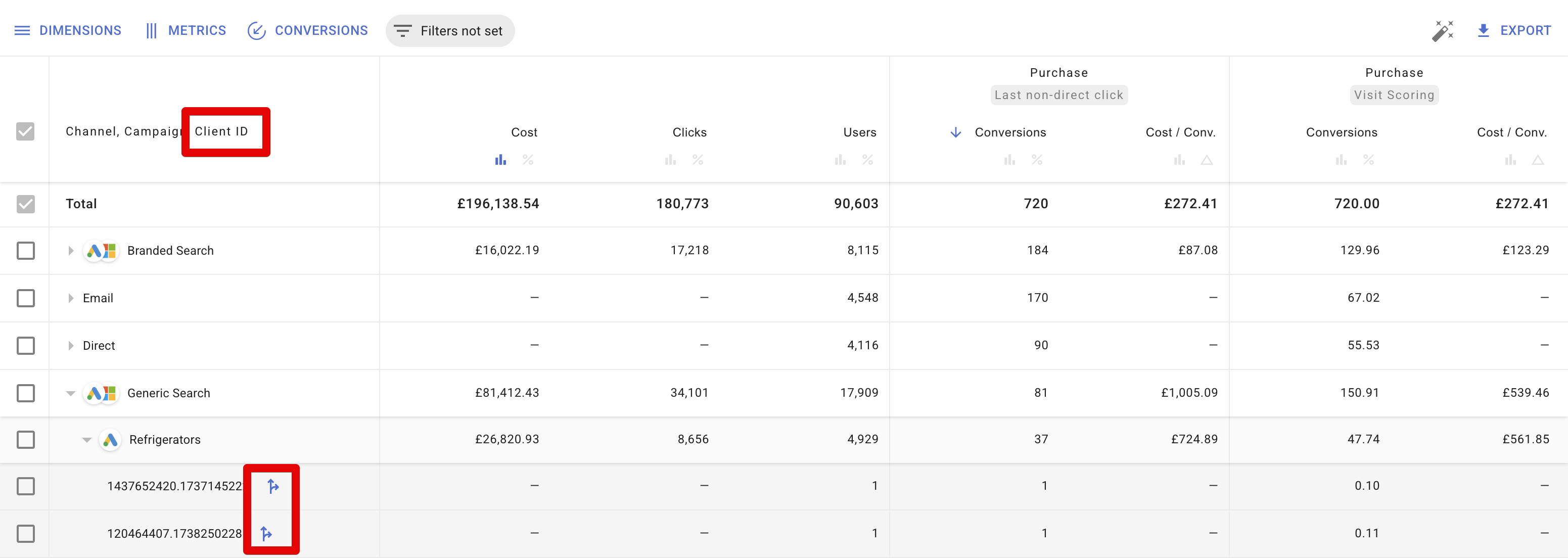
Navigate to the **Attribution** module.
Add one of these dimensions to the report:
* **Client ID** -- shows user journeys on one specific device.
* **User ID** -- shows a cross-device user journey, consolidating sessions from all associated Client IDs. Requires `user_id` to be collected in your GA4.
 ## User journey overview
A user-journey exploration displays:
* **Location and device type/brand**
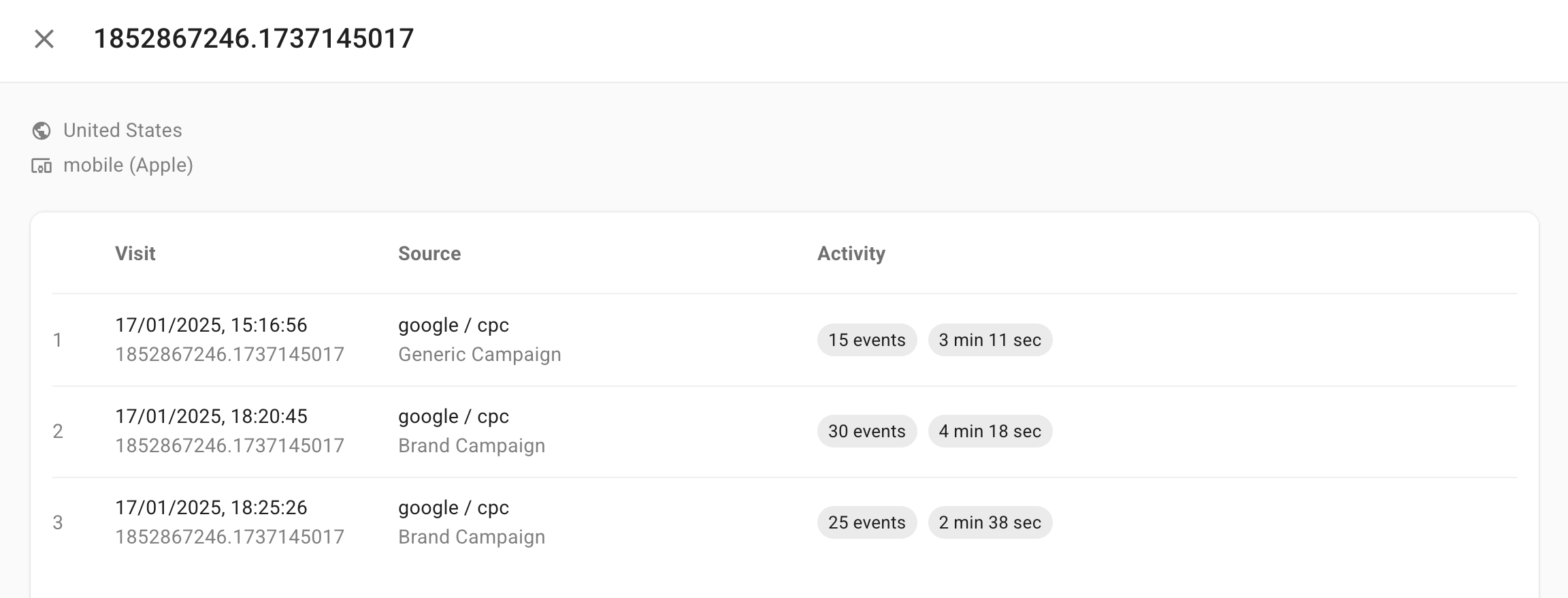
* **Session list** with the following columns:
* **Visit** -- initial timestamp and client ID.
* **Source** -- the Source/Medium and Campaign that initiated the session.
* **Activity** -- the number of events tracked, session duration, number of conversions, and whether the user may have entered an audience.
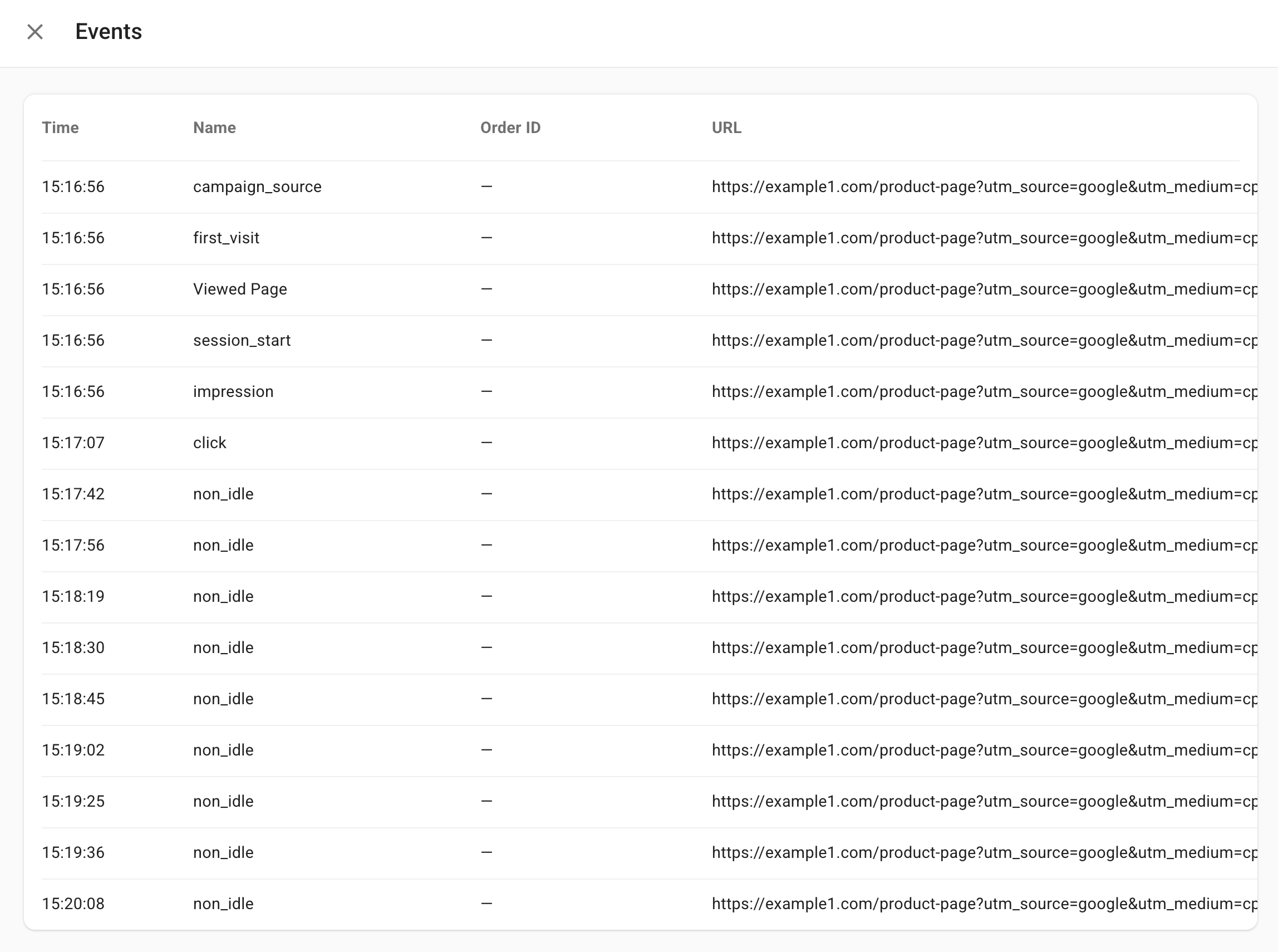
Clicking on a session reveals a detailed timeline of all events (with timestamps and URLs) that took place during that session.
## Analysing attribution using user-journey explorations
By adding conversions tracked under both **Visit Scoring** and **Last Click** attribution models, then including a breakdown by Client ID or User ID, you can compare how each model credits conversions for individual users. This shows how Visit Scoring differs from the standard last-click method.
Below are two examples demonstrating how to use user-journey explorations to understand attribution outcomes.
### Example 1
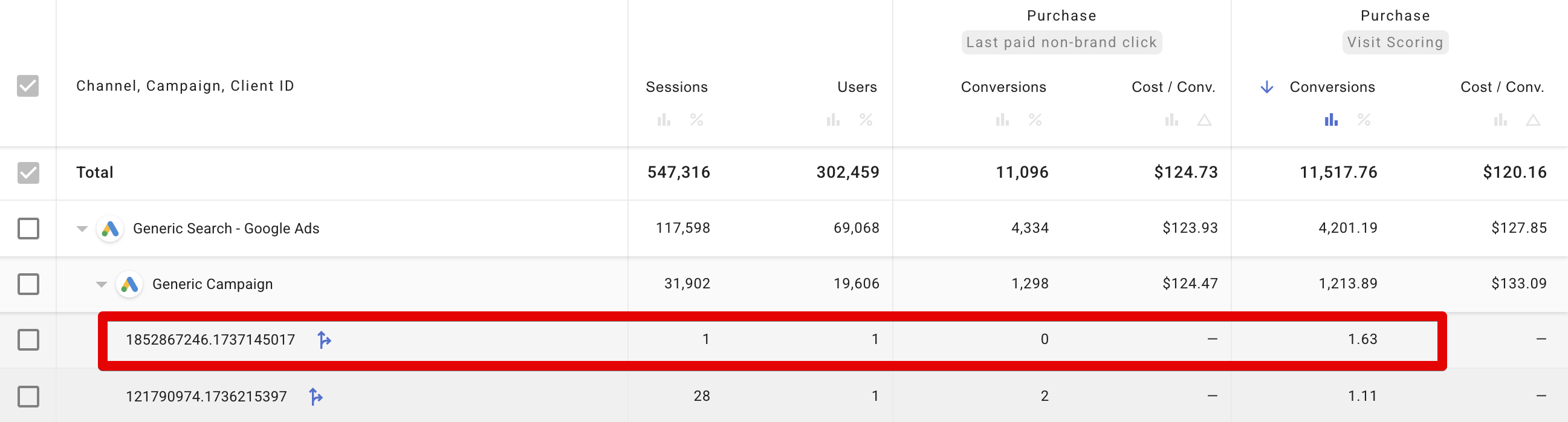
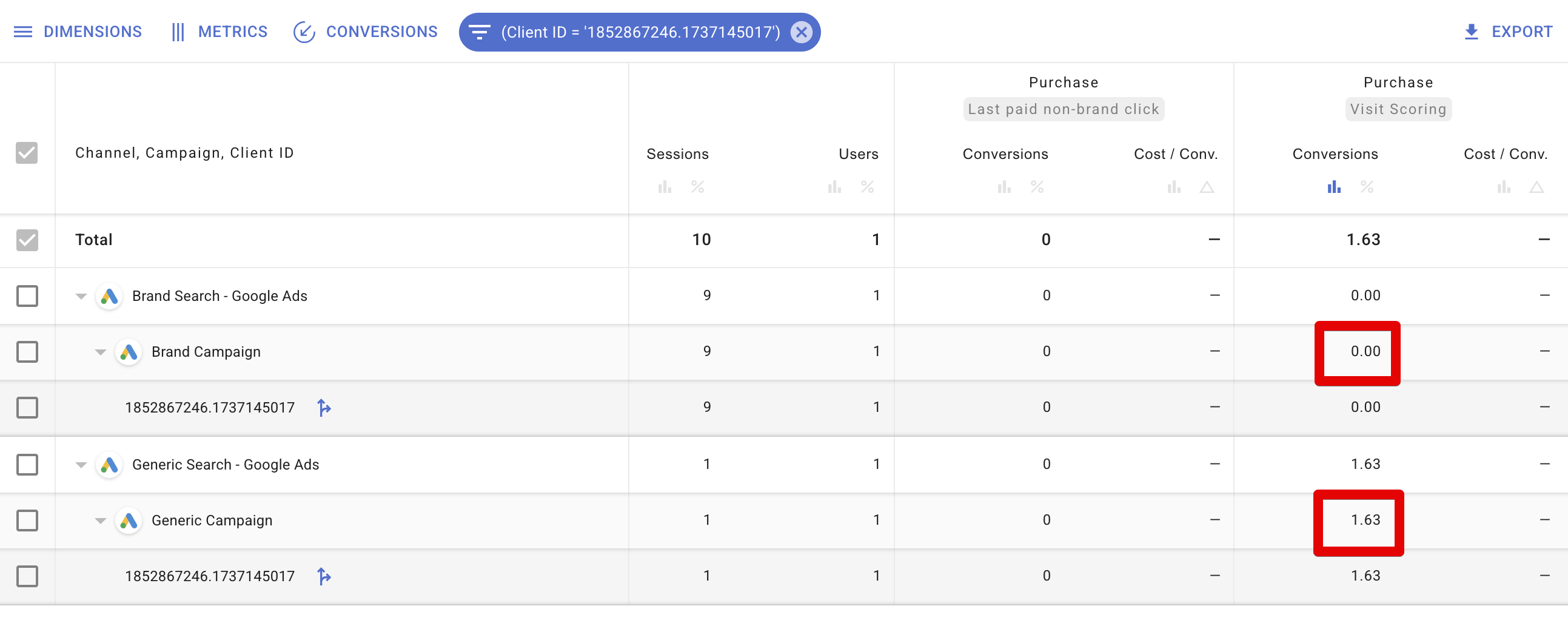
**Scenario:** No last-click conversions were recorded for this Client ID, but the Visit Scoring model attributed a score.
The table shows the Last Click model has 0 conversions, while Visit Scoring attributed a score.
## User journey overview
A user-journey exploration displays:
* **Location and device type/brand**
* **Session list** with the following columns:
* **Visit** -- initial timestamp and client ID.
* **Source** -- the Source/Medium and Campaign that initiated the session.
* **Activity** -- the number of events tracked, session duration, number of conversions, and whether the user may have entered an audience.
Clicking on a session reveals a detailed timeline of all events (with timestamps and URLs) that took place during that session.
## Analysing attribution using user-journey explorations
By adding conversions tracked under both **Visit Scoring** and **Last Click** attribution models, then including a breakdown by Client ID or User ID, you can compare how each model credits conversions for individual users. This shows how Visit Scoring differs from the standard last-click method.
Below are two examples demonstrating how to use user-journey explorations to understand attribution outcomes.
### Example 1
**Scenario:** No last-click conversions were recorded for this Client ID, but the Visit Scoring model attributed a score.
The table shows the Last Click model has 0 conversions, while Visit Scoring attributed a score.
 The user first arrived via a Generic Campaign, then later via a Brand Campaign, indicating research and interest.
 Expanding each session reveals numerous `non_idle` events, illustrating significant active time on the site.
 Because the [attribution model](/project-configuration/attribution-models) is configured to consider brand-campaign traffic as less significant, the scoring from those sessions is credited to the Generic Campaign.
 ### Example 2
**Scenario:** The Client ID has a Last Click conversion, but the Visit Scoring model awarded no score.
The report shows Last Click attributed a conversion, but Visit Scoring scored it at 0.
### Example 2
**Scenario:** The Client ID has a Last Click conversion, but the Visit Scoring model awarded no score.
The report shows Last Click attributed a conversion, but Visit Scoring scored it at 0.
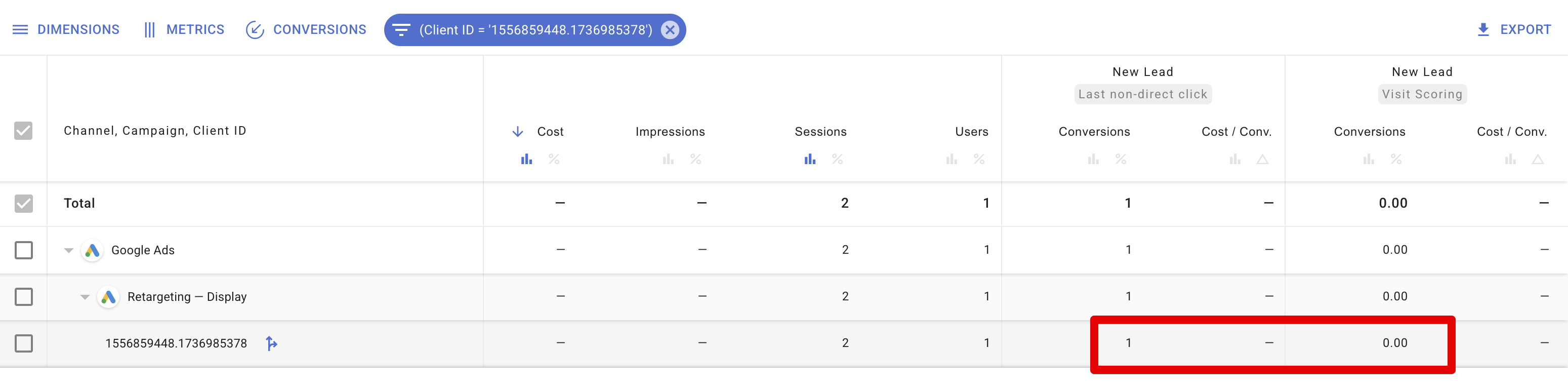 The user had only one session lasting a single second, during which they converted immediately.
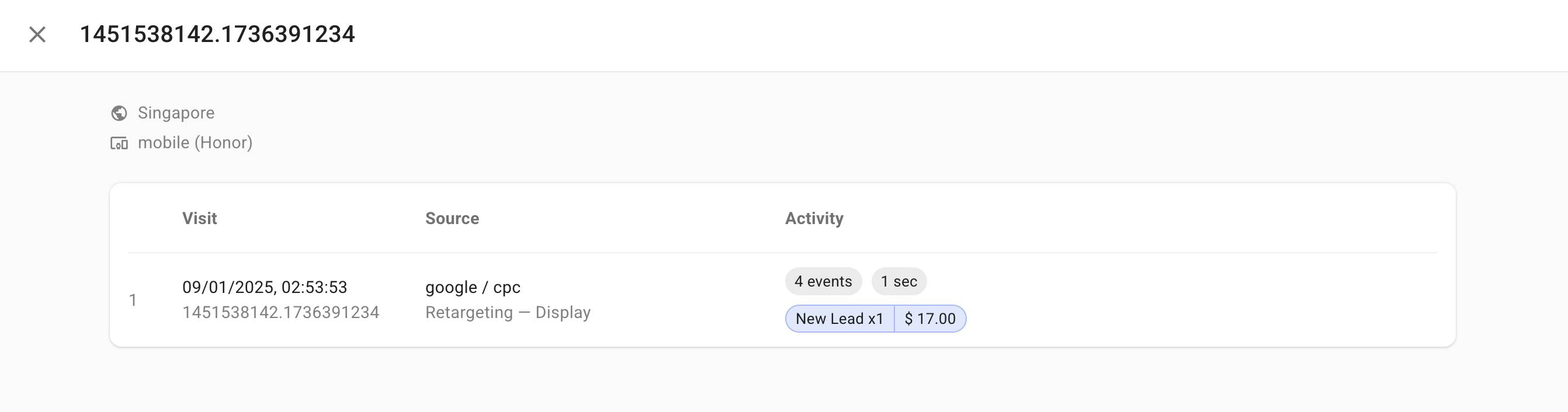 Because the session was so short, the Visit Scoring model treats it as a "fragmented" visit. It infers the purchase decision was influenced by a prior source, so it does not award any score to the campaign associated with this final click.
## Key takeaways
* **Deeper understanding of Visit Scoring** -- comparing Last Click and Visit Scoring helps you see how longer or multiple sessions contribute to final conversion credit.
* **Actionable insights** -- user-journey exploration lets you optimise campaigns by identifying which touchpoints truly drive conversions, which are brand navigations, and which might be too short or fragmented for meaningful attribution credit.
Because the session was so short, the Visit Scoring model treats it as a "fragmented" visit. It infers the purchase decision was influenced by a prior source, so it does not award any score to the campaign associated with this final click.
## Key takeaways
* **Deeper understanding of Visit Scoring** -- comparing Last Click and Visit Scoring helps you see how longer or multiple sessions contribute to final conversion credit.
* **Actionable insights** -- user-journey exploration lets you optimise campaigns by identifying which touchpoints truly drive conversions, which are brand navigations, and which might be too short or fragmented for meaningful attribution credit.